Mammal Type Classifier
Table of Contents
Question
How does a machine learn that a leopard shares more in common with a wolf than a zebra?
This project set out to explore whether a model could move beyond memorizing individual animals and instead capture the shared features that define mammal groups. In biology, leopards and wolves are classified as carnivores while zebras are ungulates, distinctions grounded in traits like teeth, jaws, limbs, and skull structure. Without anatomical data available, this becomes a question of whether a computer vision model, trained only on images, can learn the underlying biological groupings just from visual patterns. To test this, I built a mammal type classifier using supervised learning, aiming to train it to recognize subtle similarities across species and correctly classify new ones. To illustrate the goal, I created a 3D Mammal Space, where each animal is represented as a point. In this space, proximity reflects similarity, and clusters emerge for each group. The visualization reflects a structured separation I hope the model will learn to discover on its own.
Data
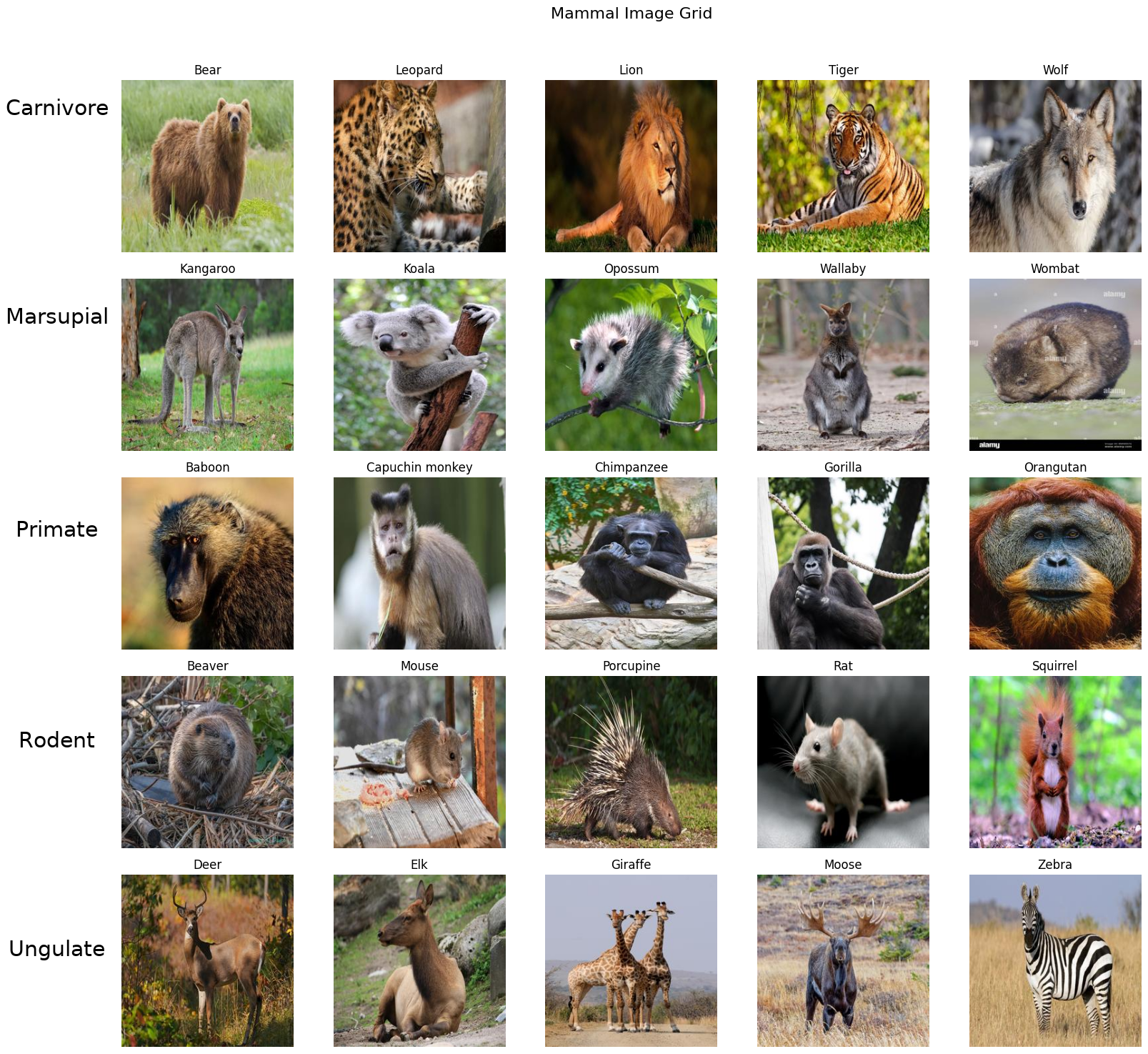
To build my dataset, I pulled images from DuckDuckGo using a custom API, aiming for about 100 images per animal. This includes all animals below from the Mammal Image Grid. Focusing on the five mammal groups: Carnivores, Marsupials, Primates, Rodents, and Ungulates. Not every download worked (some files were corrupted), so I added error handling to skip them, which left me with closer to 85–100 images per animal. This summed up to a total of 2,259 images. That turned out to be enough for the experiment I had in mind. Once collected, I resized all images to 192×192 pixels to keep them consistent and manageable, then converted them into PyTorch tensors for efficient training. Finally, I organized everything into a clean directory structure with a near 80/20 train–validation split having 1,795 images for training and 464 for testing the model.
Algorithm
For the modeling stage, I compared three leading pre-trained Convolutional Neural Networks: ResNet, EfficientNet, and MobileNet. ResNet provided a strong baseline with its ability to train deep networks. EfficientNet focused on balancing accuracy and efficiency through careful scaling. MobileNet was designed for speed and lightweight use, making it ideal for testing compact models. Evaluating all three on the same dataset allowed me to directly compare their strengths, observe the trade-offs between speed and accuracy, and assess how architectural choices influence classification results. This process also gave me hands-on experience with PyTorch and Fastai, two widely used frameworks in machine learning.
Compute
I trained all three models on my local machine using only CPU resources (AMD Ryzen 7 7730U with 16 GB of RAM). While this setup was sufficient for the experiment, it came at the cost of longer training times: MobileNet v3 Large finished in about 12 minutes, ResNet-18 in 18 minutes, and EfficientNet-B0 took the longest at 23 minutes. These results highlighted the efficiency differences between architectures, with MobileNet’s lightweight design showing clear speed advantages. To keep the comparison fair, I standardized the setup across all models: the same dataset of five mammal types, images resized to 192×192 pixels, and consistent training parameters—15 epochs, a learning rate of 0.001, the Adam optimizer, cross-entropy loss, and a StepLR scheduler. This consistency ensured that any performance differences could be traced back to the models themselves rather than variations in setup. In future iterations, I plan to experiment with GPU acceleration, which would dramatically reduce training time and open the door for deeper exploration.
Evaluation
Project Structure
The project follows a simple and modular structure with two main directories: app and model. The app directory stores the trained models and contains the Gradio application used for deployment. The model directory holds the dataset (organized into training and validation sets) along with a notebook for training and evaluating the models. The full directory structure is shown below and can also be viewed on Github
Mammal-Type-Classifier/
├── app/
│   ├── models/
│   ├── app.py
│   └── requirements.txt
├── model/
│   ├── dataset/
│   │   ├── train/
│   │   └── val/
│   ├── mammaltypeclassifier.ipynb
│   └── utils/
└── README.md
Validation
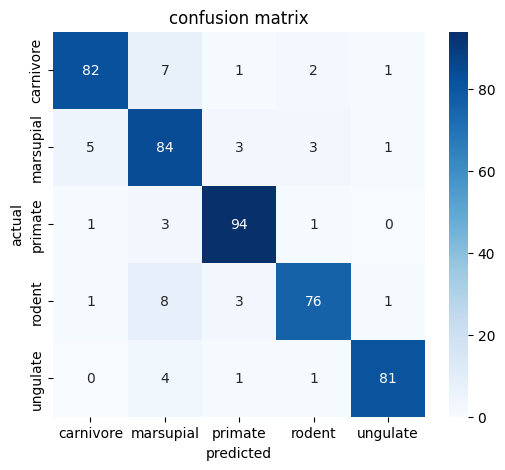
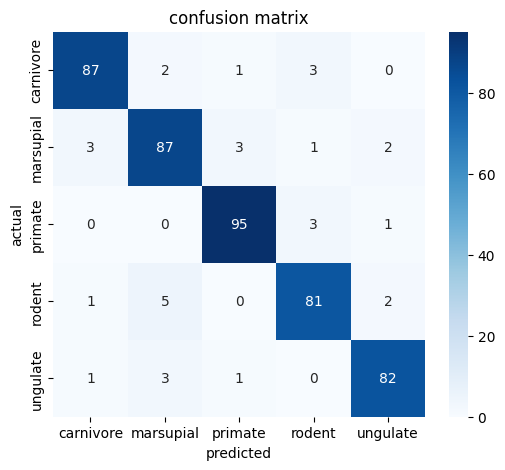
To evaluate the models, I used a validation dataset of 464 images, representing 20% of the original split. Each trained model was run once across this set, generating predictions that I compared directly with the true labels. From this, I calculated accuracy and average loss, giving me a first look at how well each architecture performed. My goal at this stage was not exhaustive experimentation but rather to complete the end-to-end process of training and evaluation as quickly as possible. Because training was limited to my local CPU, I only performed a single evaluation pass per model. For future iterations, I plan to leverage GPU resources, which will allow me to run more experiments, tune hyperparameters more freely, and explore advanced validation methods.
----------
| Total Images: | 464 |
| Correct Prediction: | 417 |
| Accuracy: | 89.9% |
----------
| Total Images: | 464 |
| Correct Prediction: | 432 |
| Accuracy: | 93.1% |
----------
| Total Images: | 464 |
| Correct Prediction: | 422 |
| Accuracy: | 90.8% |
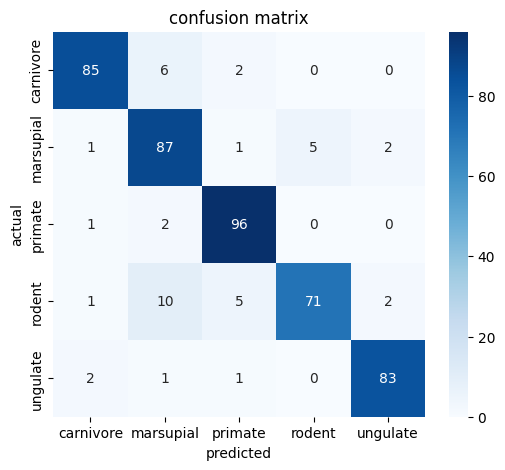
EfficientNet performed best with 93.1% accuracy, followed by MobileNet (90.8%) and ResNet (89.9%). All models handle primates extremely well (94–96 correct predictions), showing strong feature consistency, while rodents are the most difficult class.
Deployment
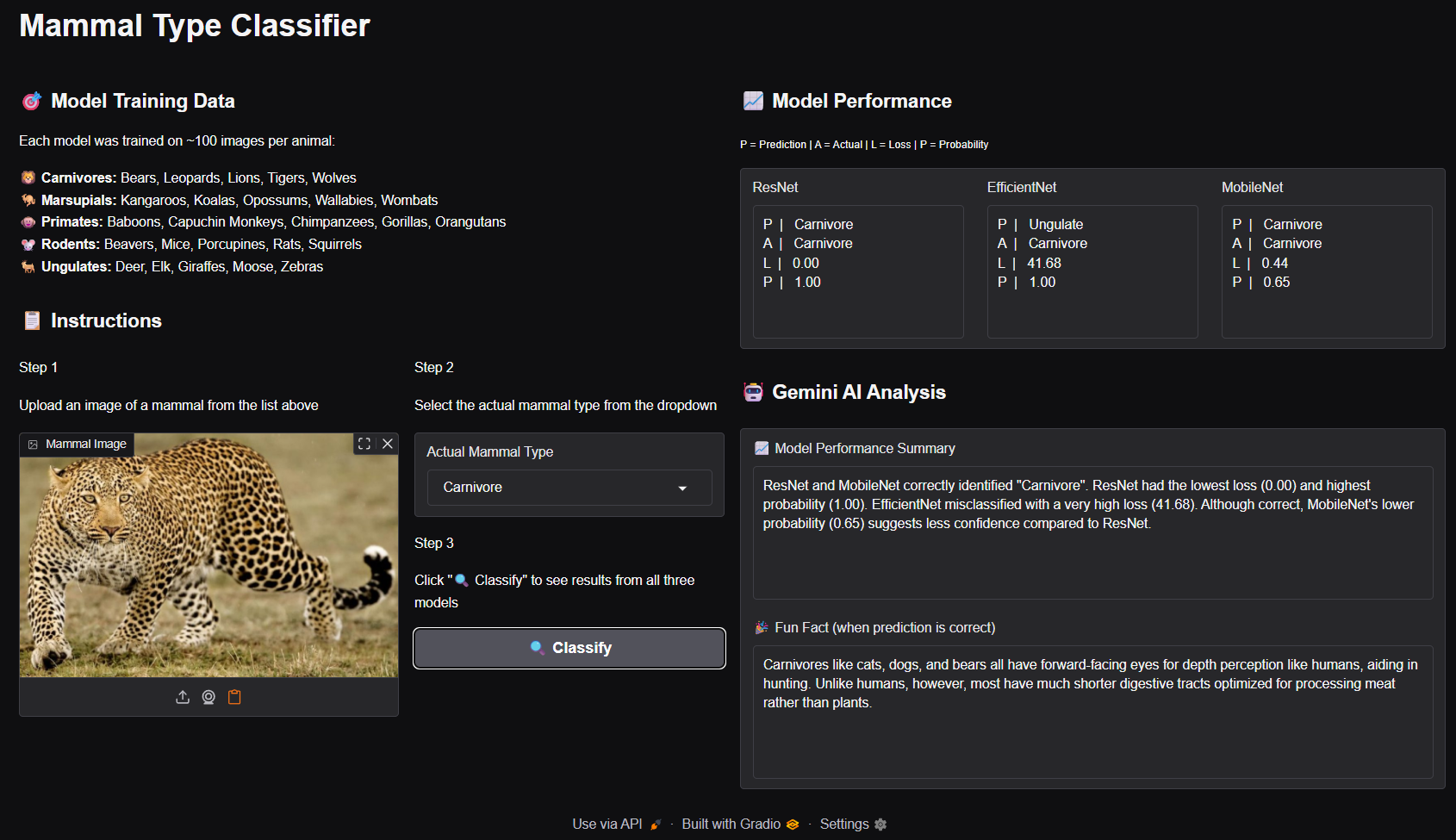
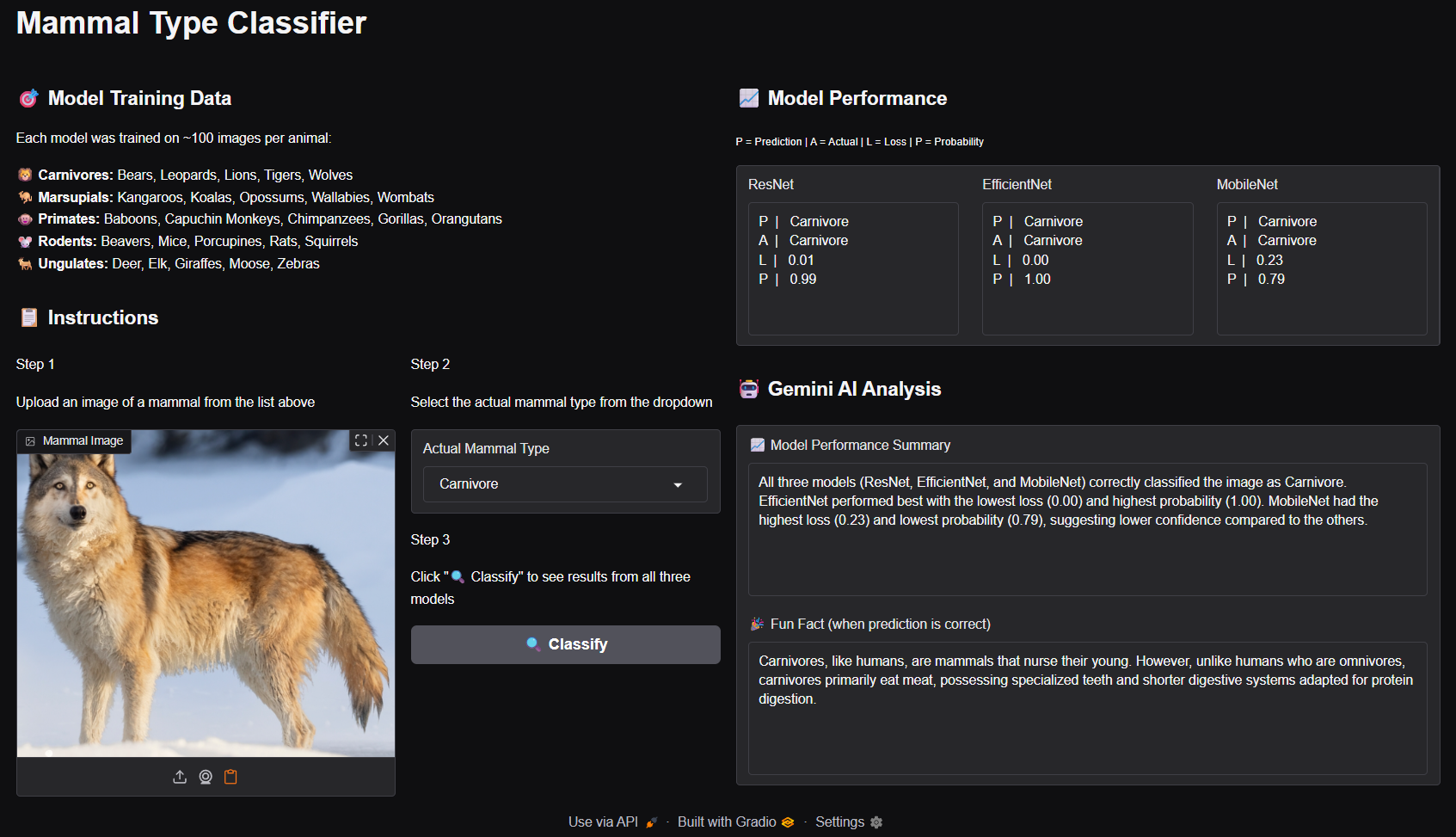
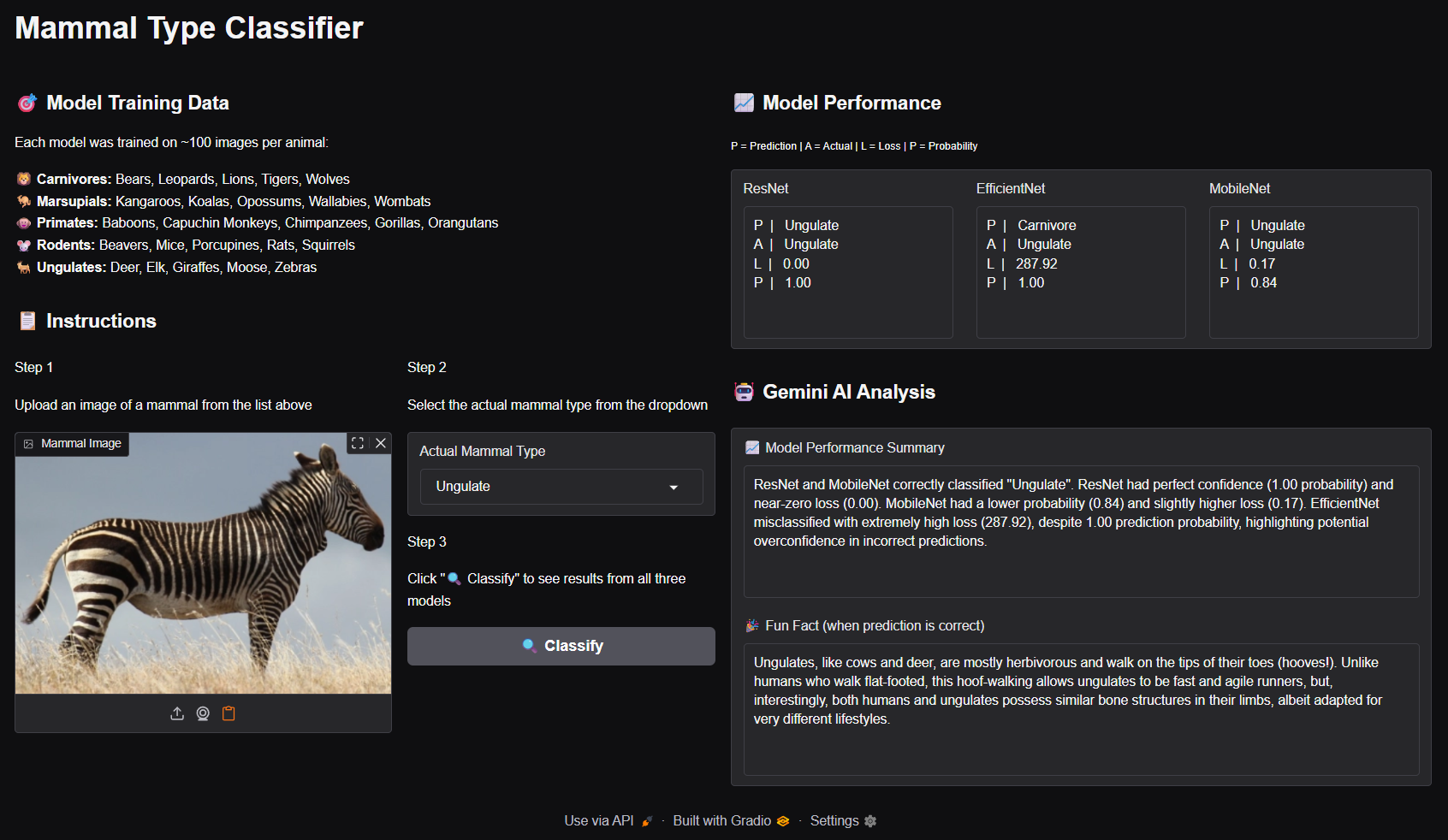
After training and evaluation, I saved the models as pickled files so they could be reused without retraining and integrated them into a Gradio web app. The application’s core feature includes a multi-model comparison interface, letting users test an image across ResNet, EfficientNet, and MobileNet while seeing the predicted label, actual label, loss, and prediction probability for each. To make the experience more engaging, I added Gemini LLM features: an automated performance summary that highlights which models were correct and how they differed, and a fun fact about the animal whenever a model gets the prediction right. Together, these features turn a simple classifier into an interactive, educational tool that not only demonstrates model performance but also makes the results more insightful and rewarding to explore.
Leopard classification
Wolf classification
Zebra classification
Conclusion
In the end, the project gave me a partial but meaningful answer to my original question. By building a CNN-based mammal classifier, I was able to see the idea in action, most clearly in the MobileNet result above which correctly grouped the leopard and wolf as carnivores while distinguishing the zebra as an ungulate. What I don’t yet have is a full grasp of the mathematics behind how these connections are formed, but I now have a working system that makes the process visible through application. The real achievement lies in transforming an abstract question into something tangible: an end-to-end classifier and interactive app that not only validates the idea in practice but also lays the foundation for deeper exploration.
References
- Mammal Type Classifier – my GitHub project exploring image classification of mammals using CNNs
- Gemini API – quickstart guide for setting up your free Google Gemini API key to run AI experiments